Introduction
Thank you for purchasing Link Crown. This guide covers everything from opening the project to publishing your own version of the game. Every setting lives in one place (the Game Config), every screen and popup is a regular prefab, and every level is plain data you can edit in the built-in Level Editor.
How the game plays
The rules
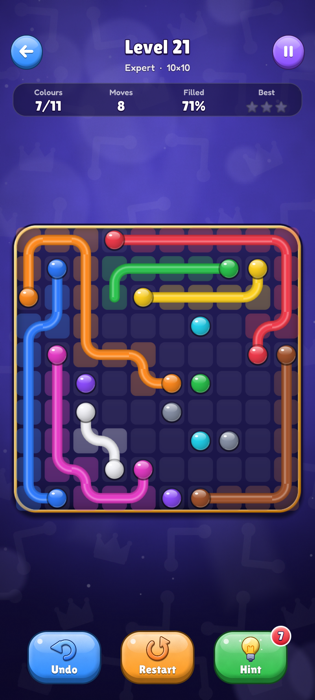
- Drag from a dot to draw a pipe to the other dot of the same colour.
- Pipes can't cross. Drawing over a pipe cuts it; move back and the cut pipe comes back.
- Connect every colour and fill every cell of the board to solve the level.
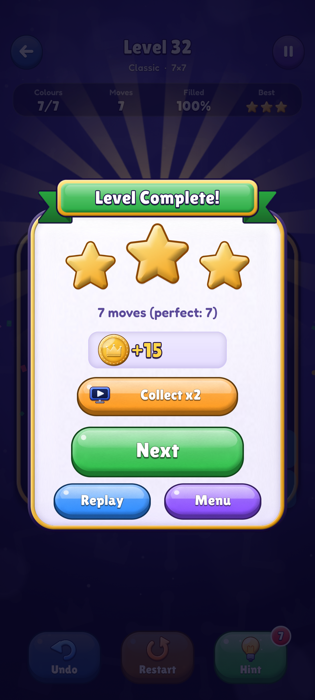
Touching a dot starts its pipe again from that dot; touching a pipe continues it from there. The counters above the board show the connected colours, the moves and how much of the board is filled. A move is counted each time the player changes the board with a different colour than the last move, so a perfect game uses one move per colour (tapping a dot without drawing is not a move).
Undo takes back the last change. Restart (toolbar or Pause menu) clears every pipe and the move counter, so a perfect game is still possible, and can itself be undone; hints used stay counted until the level is solved. Replay, after a level is solved, starts a fresh try.
Stars
| Stars | When |
|---|---|
| 3 | Solved with no hint and one move per colour (perfect). |
| 2 | Solved with no hint. |
| 1 | Solved with hints. |
Each new star gives coins (Coins Per Star); replaying a level for more stars gives the coins of the extra stars only.
Home
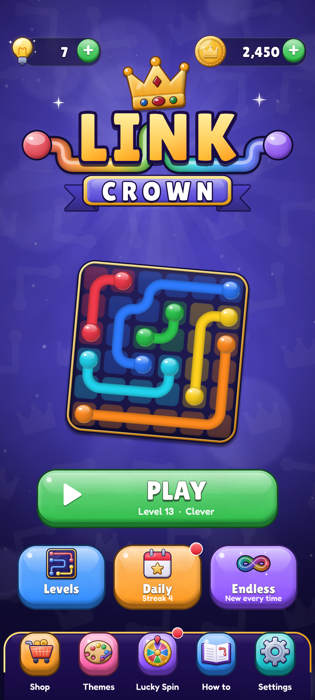
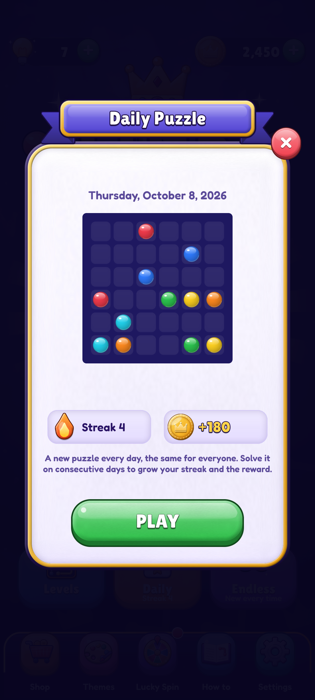
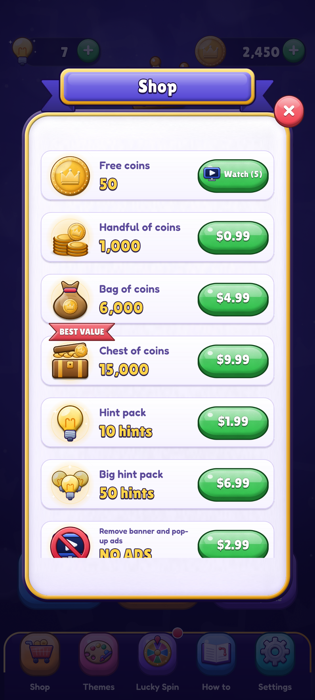
The home screen shows the hints and coins (with shortcuts to get more), the logo, a solved level as illustration, a big PLAY button that continues with the next level to solve, and three modes: Levels (pack list), Daily (with a red dot until today's puzzle is solved) and Endless. The bottom bar opens the Shop, Themes, the Lucky Spin, How to play and the Settings.
Packs and levels
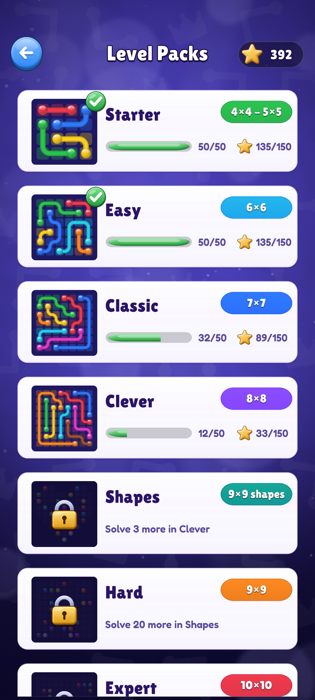
Each pack card shows a preview of one of its levels, its size, the levels solved and the stars. A pack opens when enough levels of the previous pack are solved (or early, with coins). Inside a pack, levels open one after the other (this can be switched off).
First level
On the very first level an animated hand shows how to draw, and a short text explains the goal; it turns into "fill every empty cell" when all colours are connected but cells are left. The How to Play popup also opens once on the first launch.
Requirements
- Unity 6000.0 LTS. Made and tested with 6000.0.84f1. Use 6000.0.58f2 or newer: older editors produce builds affected by the CVE-2025-59489 security issue.
- Android: Android Build Support with its SDK, NDK and OpenJDK, installed from Unity Hub. The game runs on Android 7.0 (API 24) and newer.
- iOS: iOS Build Support, a Mac with Xcode (and CocoaPods once you add AdMob). The game runs on iOS 13 and newer.
Included: Unity IAP 5.4 (installed from the Package Manager through Packages/manifest.json) and TextMesh Pro (part of uGUI). Not included: the Google Mobile Ads plugin, which you download from Google when you are ready to show ads (see Ads). The game builds and runs without it.
Your own accounts and possible costs
AdMob and Unity IAP are third-party services. The project contains the complete integration, but to show real ads, sell in-app purchases and publish the game you need your own accounts, and some of them cost money:
- Google AdMob (ads): your own AdMob account. Creating it is free; Google pays your ad earnings under its own terms and payment thresholds.
- Google Play: a Google Play Console developer account, one-time registration fee (US$25 at the time of writing).
- App Store: an Apple Developer Program membership (US$99 per year at the time of writing) and a Mac.
- Store fees: Google and Apple keep a commission on every in-app purchase, usually between 15% and 30%.
- Unity: Unity's own license terms apply; Unity Personal is free within Unity's revenue limits.
These accounts and fees belong to Google, Apple and Unity, not to this project. Check their current terms and prices before you publish.
Getting started
- Unzip the download. In Unity Hub choose Add → Add project from disk and select the
LinkCrownfolder. - Open it with Unity 6000.0. The first import takes a few minutes (the Package Manager installs Unity IAP).
- Open the scene with Tools → Link Crown → Open Main Scene and press Play.
- Switch the platform to Android or iOS in File → Build Profiles.
- Open the settings with Tools → Link Crown → Game Config.
The game runs in the editor just like on a phone: set the Game view to a portrait resolution (for example 1080×1920) or use the Device Simulator. In the editor and in development builds, placeholder ads drawn by the game show where ads appear (rewarded ones give their reward), and purchases go through Unity's fake store, so every feature can be tried before you set anything up.
Project structure
| Folder (Assets/LinkCrown) | Content |
|---|---|
| Art | Every picture: Board (dots, pipe textures, cells, frame, colour-blind symbols), Backgrounds, Icons, UI (buttons, panels, wheel…), the app icon. |
| Audio | Music and sound effects (WAV). |
| Config | Dot palettes and board themes (ScriptableObjects). |
| Levels | The level packs and the daily pool (ScriptableObjects, edited with the Level Editor). |
| Prefabs | Every screen, popup and widget, and the logo. |
| Resources | GameConfig.asset and Localization/strings.csv. |
| Scenes | Main.unity. |
| Scripts/Runtime | The game (assembly LinkCrown). Core holds the puzzle logic with no Unity code: level format, solver, generator, difficulty rater, rules of play. |
| Scripts/AdMob | The AdMob integration, compiled only when the Google Mobile Ads plugin is in the project. |
| Scripts/Editor | Menu, Level Editor, import rules and build checks. |
| Fonts, Plugins, ThirdPartyLicenses, Documentation | Fonts and their licenses, the iOS haptics plugin, this guide. |
Outside that folder: Assets/Resources/BillingMode.json (Unity IAP store choice) and Assets/TextMesh Pro (TextMesh Pro essentials).
Game Config
All the settings, grouped by header. Hover a field in the Inspector to see its tooltip.
| Group | Fields |
|---|---|
| Levels | The packs in order, the daily pool, Sequential Levels (levels open one after the other). |
| Endless mode | Board sizes offered, coins per endless puzzle. |
| Rewards | Coins per star, daily puzzle coins, streak bonus per day and Daily Streak Bonus Days (how many days the bonus keeps growing, 7). |
| Hints | Hints at the start, hints per rewarded ad and ads per day, size and coin price of the hint pack. |
| Economy | Coins at the start, free coins for a rewarded ad in the shop and ads per day. |
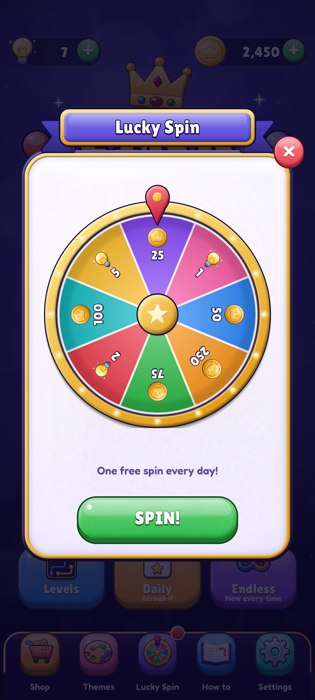
| Lucky Spin | 8 slots, clockwise from the top (coins or hints, amount, weight; keep exactly 8, the wheel has 8 segments) and extra spins per day for rewarded ads. |
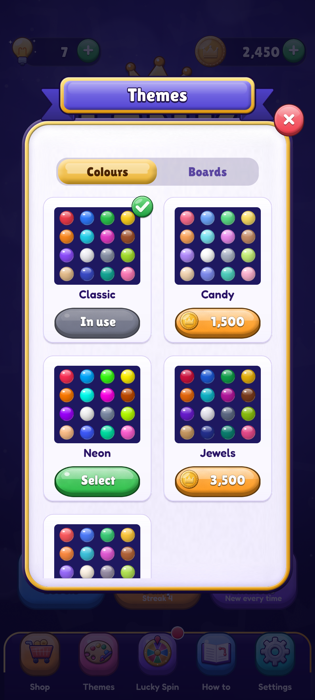
| Themes | The dot palettes and board themes offered in the Themes popup. |
| Ads | Enable Ads, Use Banner, interstitial frequency and cooldown, the AdMob App IDs and ad unit ids (Google's public test ids in the package: replace them with yours), your test device ids. |
| Purchases | Test Purchases and the product list. |
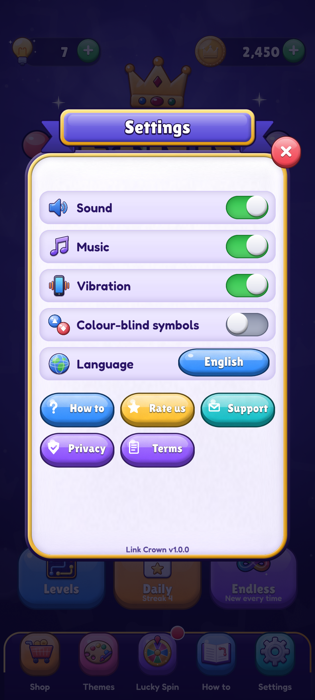
| Links | Privacy policy, terms, store pages and support e-mail used by the Settings popup. |
Levels & Level Editor
A level is stored as text, one character per cell, row by row from the top: . empty, # no cell (shaped boards), A–Z a dot (each colour exactly twice). The solution is stored next to it (one hex digit per cell giving the directions the pipe leaves the cell); hints use it.
width 5, height 5
cells  "A...BC.D.B..E.D.C..E.A..."   (5 rows of 5)
links  "64a2c5..."                     (filled by the editor)
The Level Editor
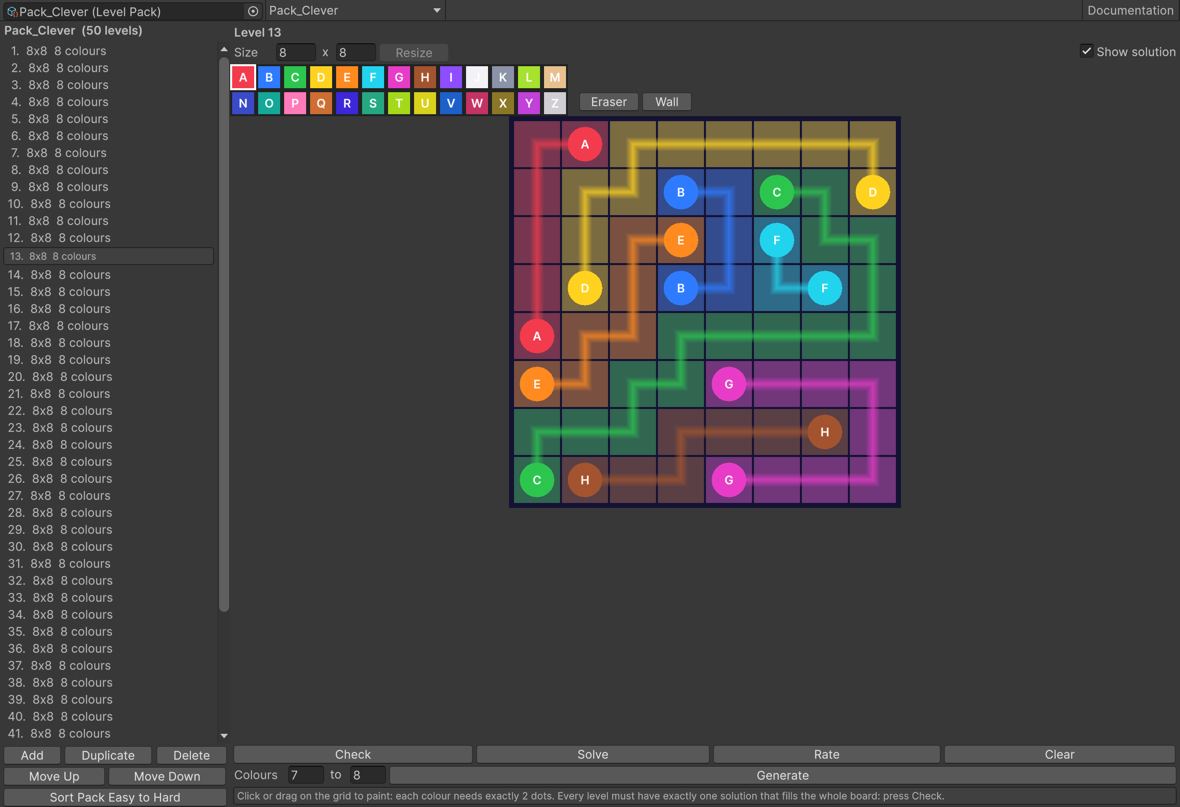
Tools → Link Crown → Level Editor. Pick a pack at the top (or select a Level Pack asset and press Open in Level Editor).
- List (left): select a level; Add, Duplicate, Delete, Move Up / Down; Sort Pack Easy to Hard rates every level and orders the pack.
- Size: change the width and height (2 to 15) and press Resize.
- Brushes: 26 colours (A to Z), Eraser and Wall. Click or drag on the grid to paint. Each colour needs exactly 2 dots.
- Check: proves whether the level has exactly one solution, more than one, or none. A level is ready when it has exactly one.
- Solve: finds a solution and stores it (used by hints and previews). Show solution draws it on the grid.
- Rate: how hard the level feels: solvable by logic alone, or the number of guesses a player needs.
- Generate: replaces the level with a new random one of the same size and colour range, with exactly one solution. Walls you painted are kept, so you can draw a shape and generate levels for it.
Before each build, a warning in the Console lists the levels that have no valid solution stored (for example a level painted after its last Check): open them and press Check or Solve.
Adding a pack
- Assets → Create → Link Crown → Level Pack. Give it a unique Id (used in the save), a Name Key (add it to the CSV), a colour, the levels of the previous pack needed to open it and an optional coin price.
- Fill it in the Level Editor (Generate makes this quick), then sort it.
- Add it to Packs in the Game Config. The pack list builds itself from that array.
The daily puzzle
The daily pool (Levels/Daily_Pool, 366 levels from 6×6 to 9×9 and shapes) gives one level per calendar day, the same for every player. Edit or extend it like any pack.
Endless mode & the generator
The generator (Core/PuzzleGenerator.cs) covers the board with random pipes that never touch themselves, puts the dots at their ends and keeps the result only when the solver proves there is exactly one solution. The solver (Core/PuzzleSolver.cs) sweeps the grid cell by cell and counts every possible arrangement of pipes, so its answer is exact, not a guess. On a phone a 12×12 puzzle takes a fraction of a second; it runs on a background thread so the game never freezes.
The same code is used by the Level Editor and can be called from your own scripts:
var settings = new PuzzleGenerator.Settings { width = 8, height = 8, minColors = 7, maxColors = 8 };
LevelData level = PuzzleGenerator.Generate(settings, Rng.FromTime());      // null if none found
PuzzleSolver.Result r = PuzzleSolver.Check(level);                          // Unique, Multiple, NoSolution
PuzzleRater.Rating rating = PuzzleRater.Rate(level);                        // guesses needed
An endless puzzle left unfinished is saved with the game and offered again with Continue.
Economy & rewards
| Source | Default |
|---|---|
| New stars on a level | 5 coins per star (up to 15 per level). |
| Daily puzzle | 100 coins, + 20 per day of streak from day 2 (up to +140 from day 8). A puzzle started before midnight counts for the day it was started. |
| Endless puzzle | 5 coins. |
| Lucky Spin | 1 free spin per day + 3 more with rewarded ads; prizes are coins or hints. |
| Free coins (shop) | 50 coins per rewarded ad, 5 per day. |
| Hints | 3 at the start; +1 per rewarded ad (5 per day); 3 hints for 150 coins; hint packs and the starter bundle in the shop. |
| Double coins | After a level, a rewarded ad doubles the coins won. |
Coins are spent on themes and on opening packs early. Every reward is saved as pending the moment it is won and added when the player collects it, so closing the app during an animation never loses it.
Themes
Dot palettes (Config/Palette_*): 16 colours each; colour A of every level uses the first one, B the second, and so on. Included: Classic (free), Candy, Neon, Jewels and Sunset. Board themes (Config/Board_*): background picture, preview, frame tint, empty cell colour and how strongly a cell takes the colour of its pipe. Included: Midnight (free), Ocean, Forest, Sunset, Graphite and Royal.
Create new ones with Assets → Create → Link Crown → Dot Palette / Board Theme and add them to the Game Config. Ids must stay unique (they are saved).
Colour-blind symbols (Settings): each colour gets its own symbol on its dots (circle, triangle, square, diamond, star…; Art/Board/Symbols).
Reskinning
- Replace any PNG in
LinkCrown/Artwith your own of the same name: it gets the same import settings (sprite mode, 9-slice borders, compression) automatically. - Dots are drawn in grey and tinted with the palette colour (
dot_base), with a white gloss on top (dot_shine). Pipes usepipe_profile(the shading across the pipe) andpipe_shine. - Colours of the palettes, backgrounds and boards are data: change them in the Config assets.
- The app icon is in
Art/UI/AppIcon(full icon, Android adaptive foreground and background, round icon). - Screens and popups are prefabs in
Prefabs/UI; open them to move or restyle elements. - Fonts: Lilita One (titles, buttons) and Fredoka (texts), as TextMesh Pro font assets in
Fonts.
Localization
The game comes in English, French, Spanish, Portuguese (Brazil), German, Italian, Indonesian, Swedish and Dutch. On first launch it follows the phone's language (English for any other) and the language button in Settings cycles through all of them.
All texts are in LinkCrown/Resources/Localization/strings.csv: one row per text, the key first, then one column per language. Lines starting with # are comments.
key,en,fr,es,pt,de,it,id,sv,nl
level_n,Level {0},Niveau {0},Nivel {0},Nível {0},Level {0},Livello {0},Level {0},Nivå {0},Level {0}- Edit the file in any spreadsheet program and save it as CSV (UTF-8).
- To add a language, add a column with its code and fill in
language_name, then add the matching case inFromSystemLanguageandCultureinLoc.cs. - The fonts cover Latin alphabets with Western European accents. For other alphabets add a fallback font to the TextMesh Pro font assets.
- Right-to-left languages (Arabic, Hebrew, Persian, Urdu) are not supported out of the box: TextMesh Pro doesn't join Arabic letters by itself, the screens are not mirrored, and the included fonts have no Arabic or Hebrew letters. To add one, use an RTL / Arabic shaping solution for TextMesh Pro (for example the free, open-source RTLTMPro package), add a font that covers the alphabet as a fallback font, and check every screen in that language, as texts that mix numbers and words may need small changes.
- In the scene, texts use the Localized Text component with a key. In code, use
Loc.Get("key")orLoc.Format("key", value).
Ads (AdMob)
ca-app-pub-3940256099942544, listed on developers.google.com/admob/android/test-ads and /ios/test-ads). They only ever show Google's test ads and earn nothing. There is no other id in the package, and the Google Mobile Ads plugin is not included.| Game Config field | Shipped value (Google test id) |
|---|---|
| Admob Android App Id | ca-app-pub-3940256099942544~3347511713 |
| Admob Ios App Id | ca-app-pub-3940256099942544~1458002511 |
| Admob Android: banner / interstitial / rewarded | .../9214589741, .../1033173712, .../5224354917 |
| Admob Ios: banner / interstitial / rewarded | .../2435281174, .../4411468910, .../1712485313 |
The game reads ad ids only from these fields: nothing is hidden in code or downloaded.
Turning AdMob on
- Download the Google Mobile Ads Unity plugin from Google: github.com/googleads/googleads-mobile-unity/releases (written and tested with version 11.5). Import the
.unitypackagewith Assets → Import Package → Custom Package. - Link Crown notices the plugin and switches its AdMob code on by itself (the
LINKCROWN_ADMOBdefine, for Android and iOS), and copies the App IDs from the Game Config into Assets → Google Mobile Ads → Settings (also before every build). Check it with Tools → Link Crown → Ads → AdMob Status. - Build for your phone: Google's test ads show right away.
- In AdMob, create your app and three ad units: banner, interstitial and rewarded.
- Replace the App IDs and ad unit ids in the Game Config with yours. An App ID of your own already in Google's settings is never replaced by a test one.
- To keep testing with your own ad units, add your phone to Test Device Ids (the device id is printed in the log by the Google SDK). Never click your own live ads.
Removing the plugin switches the AdMob code off again; the game always builds, with or without it.
Consent (GDPR)
The game uses Google's User Messaging Platform. Create a consent message in AdMob under Privacy & messaging and the form shows automatically to users in regions that need it. Ads are requested only once consent allows it, and an Ad privacy button appears in Settings when the user must be able to change their choice. If the consent request fails (no internet), it is tried again when the app comes back to the foreground.
When ads show
| Format | Behaviour (Game Config) |
|---|---|
| Banner | At the bottom of the screens when Use Banner is on; the layout moves up to make room. |
| Interstitial | After a solved level, from level Interstitial From Level, every Interstitial Every levels, never within Interstitial Cooldown seconds of another full screen ad. |
| Rewarded | Hints, free coins, double coins after a level, extra Lucky Spins. These buttons only work when an ad has loaded. |
The No Ads purchase removes banners and interstitials. Rewarded ads stay, because the player chooses to watch them. To turn every ad off, untick Enable Ads.
Placeholder ads
Without an ad network, the editor and development builds show placeholder ads drawn by the game (a full screen card with a countdown and a banner bar), so you can see where ads appear and test every reward. Release builds never show them.
In-app purchases
Purchases use Unity IAP 5 (com.unity.purchasing 5.4.4), with Google Play Billing Library 9 on Android and StoreKit 2 on iOS. The LINKCROWN_IAP define is set automatically for any 5.x version (asmdef version defines). If another major version is installed, the store code is switched off and a dialog, a Console warning and a build warning tell you right away; purchases are never switched off silently.
On Android the store is chosen by Assets/Resources/BillingMode.json, set to Google Play. Keep this file: without it Unity IAP uses its fake test store on Android. To change it, use Services → In-App Purchasing → Switch Store....
| Product (default id) | Kind | Gives |
|---|---|---|
| com.yourcompany.linkcrown.coins_small / coins_medium / coins_large | Consumable | 1,000 / 6,000 / 15,000 coins |
| com.yourcompany.linkcrown.hints_small / hints_large | Consumable | 10 / 50 hints |
| com.yourcompany.linkcrown.noads | Non-consumable | No banner or interstitial ads |
| com.yourcompany.linkcrown.starter | Non-consumable | 3,000 coins, 15 hints, No Ads and the Jewels palette |
- Change the ids to your own in the Game Config (a build warning reminds you while they start with
com.yourcompany). - Create the same products in Google Play Console and App Store Connect. Google only returns products once a build is uploaded to a testing track.
- Add your Google account as a license tester to buy without being charged.
Each purchase is validated, delivered, saved, and only then confirmed to the store. Delivered transaction ids are kept in the save, so a purchase is never delivered twice. One-time products come back by themselves after a reinstall; payments confirmed later (cash, Ask to Buy) show "Purchase pending" and are delivered when they go through. On iOS, Settings and the shop have a Restore button, as Apple requires.
Testing: with Test Purchases ticked, purchases are simulated in the editor and development builds while the store has no products yet. Release builds always use the real store.
Receipt validation
Google Play: in Google Play Console copy your app's Licensing key (Monetize with Play → Monetization setup). In Unity choose Services → In-App Purchasing → Receipt Validation Obfuscator..., paste it and press Obfuscate. IAPManager finds the generated GooglePlayTangle by name (kept by link.xml) and checks every receipt and that it is for the product bought. Until then, Android builds log "Google Play receipts are not validated yet".
App Store: StoreKit 2 verifies every transaction itself.
appleSignedTransaction). Deliver only when your server confirms the purchase.Your own server (optional): set IAPManager.ServerValidation; the game waits for your answer before delivering. PurchaseReceipt carries the product id, the transaction id, the store, the store receipt, the Google order id and the Apple signed transaction. In this example the server answers with JSON such as {"valid": true}:
using System;
using UnityEngine;
using UnityEngine.Networking;
using LinkCrown;

public class MyReceiptCheck : MonoBehaviour
{
    [Serializable]
    class VerifyResponse { public bool valid; }

    [SerializeField] string url = "https://example.com/verify-purchase";

    void Awake() => IAPManager.ServerValidation = Check;

    void Check(PurchaseReceipt purchase, Action<bool> done)
    {
        var request = UnityWebRequest.Post(url, JsonUtility.ToJson(purchase), "application/json");
        request.timeout = 15;
        request.SendWebRequest().completed += _ =>
        {
            bool valid = false;
            if (request.result == UnityWebRequest.Result.Success)
            {
                try { valid = JsonUtility.FromJson<VerifyResponse>(request.downloadHandler.text)?.valid == true; }
                catch (ArgumentException) { valid = false; } // the answer wasn't JSON
            }
            request.Dispose();
            done(valid);
        };
    }
}
Save data & cheating
Progress, stars, coins, hints, themes, purchases, settings and the levels in progress (one per mode: pack, daily and endless, so playing one never loses another) are saved in PlayerPrefs (key linkcrown_save) as JSON signed with HMAC-SHA256 and lightly scrambled. A save that was edited or damaged starts over, and the rejected one is kept under linkcrown_save_broken.
SaveManager.Secret in Scripts/Runtime/Services/SaveManager.cs with your own random text (for example a new GUID). A warning appears when you build while it is still the original. Never change it after release.This stops casual cheating; a determined player with a decompiler could still rebuild a save. If your economy needs more, keep the wallet on a server.
Daily rewards and the device clock
The Lucky Spin, the daily puzzle and its streak, and the daily ad limits follow GameClock, which never goes back: setting the clock back gives nothing (the spin and the daily puzzle say so), and a reward is free only on a later calendar day than the last one. Changing the time zone back and forth gives no extra day either; moving the clock forward can only move the next reward closer by the time zone difference.
Building
Android
- In Edit → Project Settings → Player set your company name, product name, Package Name and version.
- Create a keystore under Publishing Settings.
- With AdMob installed: if Gradle complains about missing dependencies, run Assets → External Dependency Manager → Android Resolver → Force Resolve.
- Tick Build App Bundle (Google Play) in the build profile and build.
The project targets Android 7.0 (API 24) and newer, ARM64 and ARMv7 with IL2CPP, portrait only, and uses ASTC texture compression.
iOS
- Set the Bundle Identifier and signing team in the Player settings. The minimum iOS version is 13.
- Build. With AdMob installed, open the generated
.xcworkspace(not the .xcodeproj): CocoaPods installs the Google Mobile Ads SDK during the build. - Set up the tracking prompt as explained below.
App Tracking Transparency (iOS)
When AdMob is installed, the prompt is shown by Google's UMP SDK as part of the consent flow that runs at launch. Without an IDFA explainer message in AdMob, iOS never shows it and ads are served without the IDFA.
- In Assets → Google Mobile Ads → Settings, fill in User Tracking Usage Description (for example "Your data will be used to show you ads that are more relevant to you.").
- In AdMob open Privacy & messaging, create an IDFA explainer message for your iOS app and publish it, together with your GDPR message.
- Check it on a real iPhone: Settings → Privacy & Security → Tracking must allow apps to ask. iOS asks only once per install (delete the app to see it again).
- In App Store Connect, answer the App Privacy questions to match (Device ID and Advertising Data used for third-party advertising).
Publishing checklist
- Your own AdMob, Google Play Console and Apple Developer accounts.
- Your own package name / bundle identifier, product name, icon and version.
- If you show ads: the Google Mobile Ads plugin imported, and your own App IDs and ad unit ids in the Game Config instead of Google's test ids (no warning when you build).
- A consent message published in AdMob (and an IDFA explainer for iOS).
- Your product ids in the Game Config and the same products in the stores.
- Unity IAP on a 5.x version (no warning in the Console) and
Assets/Resources/BillingMode.jsonset to Google Play. - Your Google Play license key in the Receipt Validation Obfuscator.
- Your own
SaveManager.Secret. - Your privacy policy, terms, store links and support e-mail in the Game Config.
- A release keystore (Android) and signing team (iOS).
- A release build tested on a real phone.
Code overview
| Class | Role |
|---|---|
| GameController | Entry point: loads the save and language, starts ads and purchases behind the loading screen, opens Home. |
| UIManager, UIScreen, UIPopup | Screens (Loading, Home, Packs, Levels, Game), popups, the Android back button, toasts. |
| LevelData, LevelPack | The level format and a pack of levels. |
| BoardModel | The rules while playing: drawing, cutting, undo, hints, moves, fill and the win check (no Unity code, unit-testable). |
| PuzzleSolver, PuzzleGenerator, PuzzleRater | Exact solution counting, level generation, difficulty rating. |
| BoardView, PipeGraphic | Shows the board and handles the finger; the pipes are one mesh with rounded corners. |
| GameScreen, GameSession | The playing screen and what is being played (pack level, daily, endless). |
| Progress, Wallet, GameClock, SaveManager | Stars and unlocking, coins and hints, the safe clock, the signed save. |
| AdsManager, AdMobProvider | Ads API and the AdMob implementation (Scripts/AdMob). |
| IAPManager | Purchases, validation and delivery. |
| Loc, LocalizedText | Texts and numbers in every language. |
| Tween | The small built-in tweening library used by every animation. |
Adding a popup
- Create a class deriving from
UIPopup(overrideOnOpen/OnClose). - Make a prefab with a CanvasGroup, a dim background button and a Panel; assign them on your component.
- Put it under Canvas/Popups in the Main scene and add it to the UIManager's Popups list.
- Open it with
UIManager.Instance.Get<MyPopup>().Open().
Troubleshooting
No ads show on my phone
Check that the Google Mobile Ads plugin is imported (Ads → AdMob Status), that your App IDs and ad unit ids are in the Game Config, the internet connection, that Enable Ads is on and that No Ads wasn't bought. New ad units can take hours to start serving. In the EU the consent form must be answered first.
The Android build fails after importing AdMob
Google's plugin stops the build when its Android App ID is empty. Link Crown copies the one from the Game Config before each build; if the field in the Game Config is empty, fill it in. For dependency errors run Assets → External Dependency Manager → Android Resolver → Force Resolve.
"Store not available right now"
The store doesn't sell your products yet: they aren't created, not active, or the build isn't on a testing track. Use a development build with Test Purchases on meanwhile.
Every price shows $0.01 on Android
Unity IAP is using its fake store because Assets/Resources/BillingMode.json is missing or not set to Google Play. Choose Services → In-App Purchasing → Switch Store... and pick Google Play.
A level I made says "More than one solution"
Players could solve it another way than the hint shows. Move or add dots until Check says "Exactly one solution", or press Generate.
Pink or missing pictures in a build
Edit → Project Settings → Graphics must list UI/Default in Always Included Shaders. It is set in this project.
Files named "... 2.png" or "... 2.meta" appear
The project is inside a folder synced by iCloud Drive, OneDrive or Dropbox. Keep Unity projects in a folder that isn't synced, delete the duplicates and reopen the project.
My progress was reset
The save was edited outside the game, or SaveManager.Secret changed. The old save is kept under linkcrown_save_broken. While developing, use the Cheats menu instead of editing PlayerPrefs.
Updating to a new version
Each update is a complete project with a changelog that lists what changed. Your own content lives in a few places, so you can bring it into a new version without losing anything:
- Back up first. Commit your project to version control or copy its folder.
- Open the new version as a separate project and copy your own content into it. Always copy a file together with its
.metafile: Unity keeps the links between assets through them. - Your settings:
LinkCrown/Resources/GameConfig.asset(ad ids, products, economy, links). If the changelog lists new Game Config fields, they appear with their default values; set them as you like. - Your levels: the Level Pack assets in
LinkCrown/Levels, with their ids and the order of their levels unchanged (players' stars are saved by pack id and level position). - Your look: the palettes and boards in
LinkCrown/Config, and the images, sounds and fonts you replaced. Keep the file names, or assign your files again in the prefabs. - Your texts: take the new
strings.csvand paste your own translations and edited rows into it, so the keys added by the update are kept. - Your code changes: compare your scripts with the new ones (a diff or merge tool helps) and apply your changes again.
Safe to overwrite: anything you never changed (scripts, prefabs, the scene, the documentation). If you edited prefabs or the scene, apply your edits again on the new ones.
Players' saves: keep the same SaveManager.Secret in every version (copy your secret into the new SaveManager.cs): a different secret makes every existing save look edited, and players start over. Updates only add save fields, which start with their default values, so existing players keep their coins, stars, purchases and settings. Never rename a pack id, palette id, board id or product id after release.
Before publishing the update, raise the version and the build number in Player Settings, then play the game once from a previous version's save to check that progress is kept.
Credits & licenses
The game, its code, every level, the dots, pipes, boards, backgrounds, icons, the logo, the app icon, the sounds and the music are original work created by the author, drawn and synthesized with the author's own tools. Some UI graphics (buttons, panels, icons and the Lucky Spin wheel) and five sound effects are shared with the author's other product, Ludo Crown. No stock images, emoji sets, clip art or sound libraries are used. The following third-party assets are included; their licenses are in LinkCrown/ThirdPartyLicenses and allow commercial use:
| Asset | License |
|---|---|
| Fredoka font | SIL Open Font License 1.1 |
| Lilita One font | SIL Open Font License 1.1 |
| TextMesh Pro essential resources | Unity Companion License (part of Unity's uGUI package) |
| Unity IAP | Unity's package terms (installed from the Package Manager) |
The Google Mobile Ads plugin is not included; if you add it, Google's license (Apache 2.0) applies.
Changelog & support
1.0.0
First release: 450 levels in 9 packs, daily puzzle, endless mode, Level Editor, 5 palettes and 6 boards, colour-blind symbols, AdMob-ready ads layer, Unity IAP 5 purchases, 9 languages.
Questions or problems? Leave a comment on the item page or use the support form on our profile, and include your Unity version and the platform you build for.